
Discover
A efficient way to publish 3d scenesWhat is COMP3DIO?
A 3D modeling and rendering web application, built on years of hands-on experience in real-time graphics, with a strong focus on presenting products online in an interactive 3D format. Instead of static images, the application enables end users to explore products directly in the browser — rotating, zooming, and inspecting them in real time for a more engaging and informative experience.
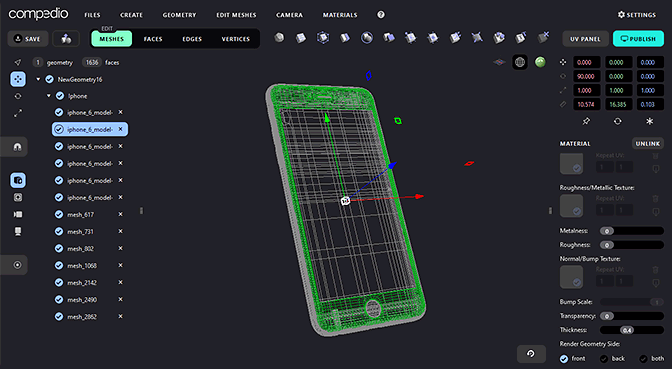
3D Modeling Tools
The modeling environment provides all essential tools required to create and edit 3D assets directly on the web. Users can build and modify geometries using standard modeling operations such as face, edge, and vertex editing, along with UV mapping for precise texture placement.
The application supports material creation and editing, object hierarchies, and scene organization, ensuring that models are production-ready. All assets can be exported as optimized GLTF files, making them ideal for real-time rendering and web delivery.
Real-Time 3D Viewer
In addition to modeling, the application includes a built-in 3D Viewer capable of rendering complete scenes in real time. The rendering environment is carefully configured to display objects and materials as realistically as possible using a rasterization-based rendering pipeline.
This approach delivers high performance while maintaining visual fidelity, making it suitable for product visualization, interactive showcases, and product configurators.
Web Integration
Integration into existing websites is simple and flexible. A custom HTML component, <compo-3d>, combined with a JavaScript file allows developers to embed 3D scenes with minimal effort.
The component can be extended with custom JavaScript, enabling additional functionality and tailored user interactions to meet specific project requirements.
Browser Compatibility
The application is compatible with all modern web browsers.
WebGL and Javascript must be enabled.
Integration Example
Left click and move for rotating the objects.
Middle click and move / scroll for zoom in and out
Right click and move for panning.
Open the App
Light version is enough to get your products online
You can have more with a free account
register now